Prerequisite: This is Part 2 of the Production Agents Deep Dive series. Start with Part 1: Idempotency & Safe Retries — checkpoint timing depends on the idempotency-key contract from that chapter.
Same agent, same crash. Without checkpoints, the work is lost. With checkpoints written before AND after each step, the resume is mechanical.
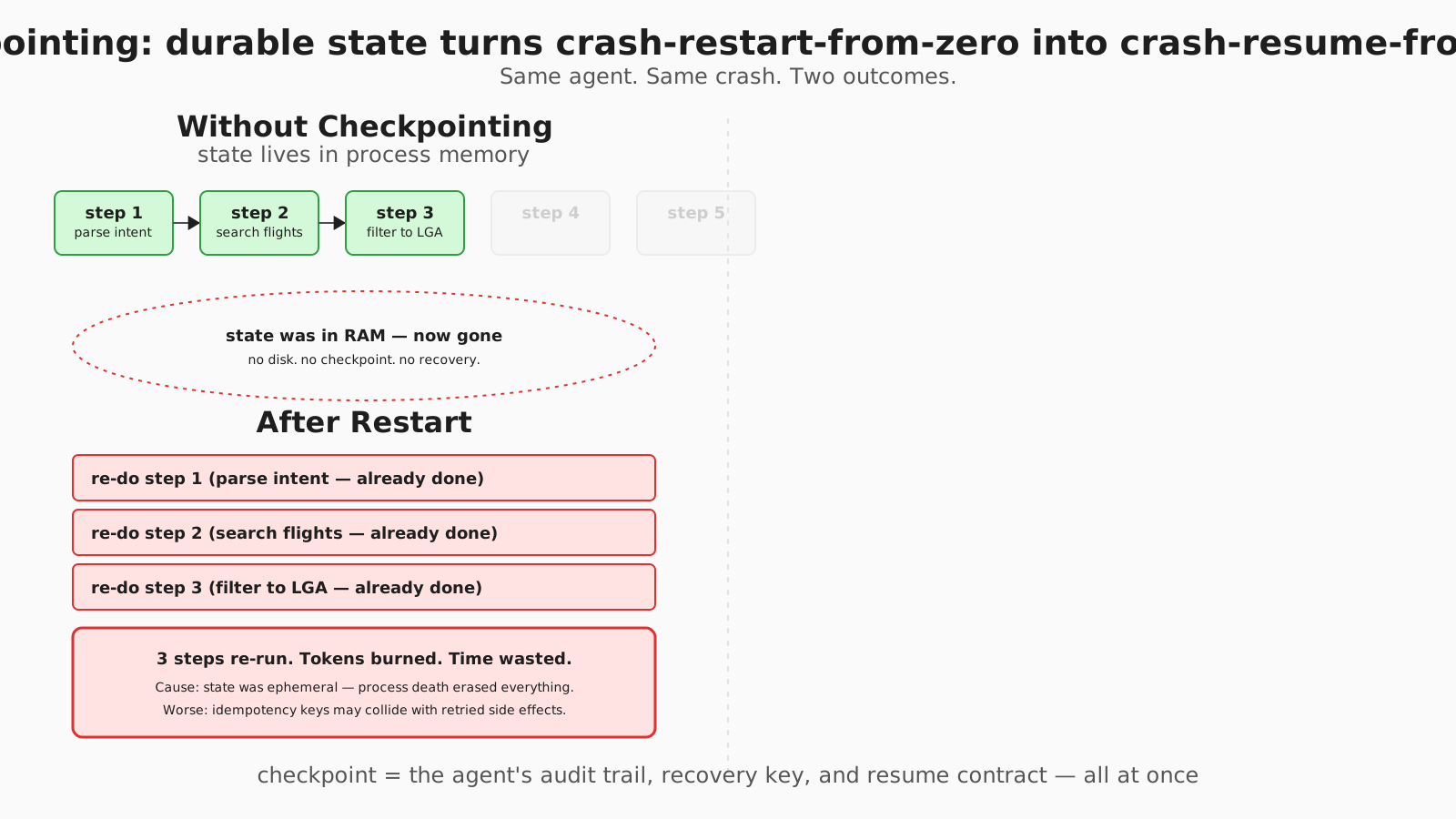
Checkpointing: durable state turns crash-restart-from-zero into crash-resume-from-step
Why This Matters
Your agent is 45 minutes into a research task. User closes their browser. Server restarts. All progress lost.
Or worse: agent crashes mid-booking. User refreshes. Agent starts over. Now there’s an orphaned booking in your system.
Anthropic’s Applied AI team named the underlying mechanic in their September 2025 context-engineering post [anthropic-context2025]:
“Long-horizon tasks require agents to maintain coherence, context, and goal-directed behavior over sequences of actions where the token count exceeds the LLM’s context window.”
Their proposed answer is structured note-taking — “a technique where the agent regularly writes notes persisted to memory outside of the context window” — so that, in their phrasing, “after context resets, the agent reads its own notes and continues multi-hour training sequences or dungeon explorations.” This chapter is the production version of that idea: checkpointers + progress files + hybrid memory, with the failure modes the framework docs gloss over.
What other content gets wrong: LangGraph tutorials show checkpointer=MemorySaver() and call it durable [langgraph-persistence]. They never show what happens when from_conn_string is used without the with-context-manager and you leak Postgres connections across requests. The Anthropic post names the mechanic but doesn’t pin a framework. This chapter bridges both — and shows why checkpoint timing (before and after execute) is what separates resumable agents from agents that resume into corrupt state.
Takeaway: state in memory only is state you don’t have. The checkpoint is the agent.
What Goes Wrong Without This:
Symptom: Agent starts over after user closes browser.
Cause:   State lived only in memory. Browser close = process kill = state gone.
       No checkpointing to durable storage.

Symptom: Agent repeats completed tasks in new session.
Cause: No explicit progress tracking. New session doesn't know what's done.
Agent re-does work, wastes time and tokens.

Symptom: Can't debug failed agent runs from yesterday.
Cause: State was ephemeral. Once process died, context was lost.
No audit trail, no replay capability.
Takeaway: every symptom here is a missing durable write. The fix is the same shape: checkpoint after every state mutation, separate intent from completion, give the resume path enough to act on.
Why Context Windows Aren’t Enough
Even with the long-context models on offer in mid-2026 (200k–2M tokens depending on model — check each provider’s current model card for exact figures):
- Complex tasks overflow: software development, research, financial modeling require more context than any window holds
- Token costs scale linearly: keeping everything in context is the most expensive way to remember
- Latency increases: larger context, slower inference, slower agents
- Attention degrades: Chroma’s Context Rot (Hong, Troynikov, Huber, 2025) shows performance drops non-uniformly as input length grows — even on simple tasks [chroma-rot]
Most production tasks require work across many sessions. The window is the wrong unit.
Takeaway: bigger windows don’t fix persistence; they just delay the problem by one order of magnitude.
The Three Challenges
| Challenge | Problem | Solution |
|---|---|---|
| Persistence | State lost on crash/restart | Checkpoint to durable storage (PostgreSQL, not in-memory) |
| Recovery | Don’t know what completed | Track progress explicitly with intent + completion markers |
| Context bridging | New session lacks context | Progress files, structured handoff, hybrid memory |
Takeaway: durable, recoverable, bridgeable — three properties, three patterns. Lose any one and the agent is fragile.
Agent Memory Systems: The Complete Picture
State management is really about memory. Understanding the different types of memory helps you design robust agents.
The Memory Taxonomy
┌──────────────────────────────────────────────────────────────────────┐
│                     AGENT MEMORY SYSTEMS                             │
├──────────────────────────────────────────────────────────────────────┤
│                                                                      │
│  WORKING MEMORY (In-Context)                                         │
│  ├── Current conversation turns                                      │
│  ├── Active task state                                               │
│  ├── Immediate observations                                          │
│  └── Token-limited, ephemeral                                        │
│                                                                      │
│  EPISODIC MEMORY (Session State)                                     │
│  ├── Conversation history                                            │
│  ├── Actions taken and results                                       │
│  ├── Decisions made and why                                          │
│  └── Checkpointed, survives crashes                                  │
│                                                                      │
│  SEMANTIC MEMORY (Long-term Knowledge)                               │
│  ├── User preferences                                                │
│  ├── Learned patterns                                                │
│  ├── Domain knowledge                                                │
│  └── Vector DB, persists across sessions                             │
│                                                                      │
│  PROCEDURAL MEMORY (How-to Knowledge)                                │
│  ├── Tool usage patterns                                             │
│  ├── Workflow sequences                                              │
│  ├── Successful strategies                                           │
│  └── Embedded in prompts/fine-tuning                                 │
│                                                                      │
└──────────────────────────────────────────────────────────────────────┘
Memory Type Comparison
| Memory Type | Persistence | Scope | Storage | Retrieval |
|---|---|---|---|---|
| Working | None (context window) | Current turn | LLM context | Automatic |
| Episodic | Session | Current task | Checkpointer (Postgres) | By thread_id |
| Semantic | Permanent | All tasks | Vector DB | Similarity search |
| Procedural | Permanent | All tasks | Prompts / Fine-tuning | Always loaded |
How They Map to Implementation
This is a conceptual sketch showing how the four memory types compose — see Solution 1 below for the correct with-wired PostgresSaver setup. The .load(...) / .save(...) method names here are illustrative; the real BaseCheckpointSaver API is get_tuple(config) / put(config, ...) with thread_id nested in the config dict.
class AgentMemory:
    def __init__(self, checkpointer):
        # Working Memory: Current context window
        self.working_memory = []  # Just conversation turns

        # Episodic Memory: Pre-built checkpointer injected by DI
        self.episodic = checkpointer  # See Solution 1 for construction

        # Semantic Memory: Long-term learned knowledge
        self.semantic = VectorDB(embedding_model="text-embedding-3-small")

        # Procedural Memory: Baked into the system prompt
        self.procedural = load_system_prompt("agent_instructions.md")

    def process_turn(self, user_input, thread_id):
        # 1. Load episodic memory (session state)
        session_state = self.episodic.load(thread_id)

        # 2. Query semantic memory (relevant long-term knowledge)
        relevant_knowledge = self.semantic.search(user_input, k=3)

        # 3. Build working memory (context for this turn)
        self.working_memory = [
            {"role": "system", "content": self.procedural},
            *session_state.get("conversation_history", []),
            {"role": "context", "content": format_knowledge(relevant_knowledge)},
            {"role": "user", "content": user_input}
        ]

        # 4. Get response
        response = llm.chat(self.working_memory)

        # 5. Update episodic memory
        session_state["conversation_history"].append(
            {"role": "user", "content": user_input}
        )
        session_state["conversation_history"].append(
            {"role": "assistant", "content": response}
        )
        self.episodic.save(thread_id, session_state)

        # 6. Optionally update semantic memory with learned insights
        if self.should_memorize(response):
            self.semantic.insert(extract_insight(response))

        return response
The Context Management Problem
The core tradeoff: More context = better understanding, but also:
- Higher token costs
- Increased latency
- Attention degradation on very long contexts
The solution hierarchy:
STRATEGY 1: Keep it small (preferred)
└── Only put what's needed for THIS turn in context

STRATEGY 2: Summarize when growing
└── Compress old conversation turns
└── Keep recent turns verbatim

STRATEGY 3: Externalize to retrieval
└── Store knowledge in vector DB
└── Retrieve relevant chunks per turn

STRATEGY 4: Multi-session handoff
└── End session with progress file
└── New session starts fresh with progress context
Memory Flow Diagram
User Request
   │
   ▼
┌─────────────────────────────────────────────────────────────┐
│                    MEMORY ORCHESTRATION                     │
│                                                             │
│   ┌──────────┐   ┌──────────┐   ┌──────────┐                │
│   │ WORKING  │   │ EPISODIC │   │ SEMANTIC │                │
│   │  MEMORY  │◄──│  MEMORY  │◄──│  MEMORY  │                │
│   │ (context)│   │ (session)│   │ (vector) │                │
│   └────┬─────┘   └────┬─────┘   └────┬─────┘                │
│        │              │              │                      │
│        │    ┌─────────▼─────────┐    │                      │
│        └───►│  BUILD CONTEXT    │◄───┘                      │
│             │  (select relevant │                           │
│             │   from each type) │                           │
│             └─────────┬─────────┘                           │
│                       │                                     │
│                       ▼                                     │
│              ┌────────────────┐                             │
│              │    LLM CALL    │                             │
│              └────────┬───────┘                             │
│                       │                                     │
│                       ▼                                     │
│              ┌────────────────┐                             │
│              │ UPDATE MEMORIES│                             │
│              │ - Episodic: +turn                            │
│              │ - Semantic: +insight                         │
│              └────────────────┘                             │
└─────────────────────────────────────────────────────────────┘
Common Memory Anti-patterns
| Anti-pattern | Problem | Fix |
|---|---|---|
| Everything in context | Token explosion, attention degradation | Use semantic memory for stable knowledge |
| No session continuity | Agent forgets mid-conversation | Checkpoint episodic memory |
| Context as database | Slow, expensive, fragile | Store data externally, retrieve what’s needed |
| No memory pruning | Unbounded growth | TTL on episodic, compaction on working |
| Ignoring procedural | Agent reinvents wheels | Bake patterns into system prompt |
Takeaway: working memory is the LLM’s RAM. Episodic memory is the session log. Semantic memory is the long-term knowledge base. Mixing them collapses both performance and clarity.
Solution 1: LangGraph Checkpointers
LangGraph is the most-deployed framework for agent state management today. Here’s how to use it in production [langgraph-persistence].
Basic Setup
PostgresSaver.from_conn_string returns a context manager (it manages the connection lifecycle), so the canonical wiring uses with:
from langgraph.graph import StateGraph
from langgraph.checkpoint.postgres import PostgresSaver

DB_URI = "postgres://user:pass@host:5432/db?sslmode=disable"

with PostgresSaver.from_conn_string(DB_URI) as checkpointer:
    # First-run only: provision the tables.
    checkpointer.setup()

    graph = StateGraph(AgentState)
    graph.add_node("think", think_node)
    graph.add_node("act", act_node)
    # ... add edges ...

    app = graph.compile(checkpointer=checkpointer)

    # Execute with thread_id for persistence
    config = {"configurable": {"thread_id": "user-123-task-456"}}
    result = app.invoke({"input": "Book flight to NYC"}, config)

    # Later: resume from checkpoint with the same thread_id
    result = app.invoke({"input": "Make it morning flight"}, config)
If you instantiate PostgresSaver outside a with block you’ll leak the underlying psycopg connection — the from_conn_string factory is explicitly typed as @contextmanager [langgraph-postgres-source]. For long-running servers, wrap the connection pool in your app’s startup/shutdown lifecycle and reuse the checkpointer across requests. checkpointer.setup() is idempotent but expensive — run it once in a migration step, not on every app boot.
What StateSnapshot Captures
# Every checkpoint stores:
{
    "channel_values": {...},     # Current state data
    "next_nodes": ["act"],       # What to execute next
    "config": {...},             # Configuration
    "metadata": {
        "writes": {...},         # Recent modifications
        "step": 5                # Progress counter
    },
    "pending_tasks": [...]       # Incomplete work
}
Storage Options
| Storage | Use case | Tradeoffs |
|---|---|---|
MemorySaver (alias of InMemorySaver) | Development | Fast, lost on restart, no concurrency |
SqliteSaver | Single-node, single-process | Local persistence, fine for prototypes, doesn’t scale horizontally |
PostgresSaver | Production | Multi-node, ACID, requires with context manager or pool |
| Custom (S3, Redis, your own) | Archival or specialised | Implement the BaseCheckpointSaver protocol — straight-line if you need it |
Production rule: use PostgresSaver (or a custom subclass of BaseCheckpointSaver backed by something durable). MemorySaver is for local development only — agents that “work in tests” but lose state in prod almost always trace back to it.
Takeaway: MemorySaver is the lint-in-the-codebase. PostgresSaver is the contract.
Solution 2: Checkpoint Timing
Most teams get checkpoint timing wrong.
Wrong: Checkpoint After Execution
# WRONG: If crash happens between execute and checkpoint,
# you don't know if step ran
def execute_step(self, step):
    result = step.run()           # Execute
    self.state['completed'].append(step.id)
    self.checkpoint()             # Save state
    # ^ If crash happens before checkpoint, step ran but state doesn't show it
    return result
Right: Checkpoint Before AND After
def execute_step(self, step):
    # BEFORE: Mark intent (crash here = know step was attempted)
    self.state['in_progress'] = step.id
    self.checkpoint()

    # Execute
    result = step.run()

    # AFTER: Mark completion
    self.state['completed'].append(step.id)
    del self.state['in_progress']
    self.state['last_result'] = result
    self.checkpoint()

    return result
Resume Logic
def resume(self):
    state = self.load_checkpoint()

    if 'in_progress' in state:
        # Crashed during execution
        step_id = state['in_progress']

        # Check if step actually completed (idempotent read)
        if self.check_step_completed_externally(step_id):
            # Step ran, just didn't checkpoint
            state['completed'].append(step_id)
            del state['in_progress']
            self.checkpoint()
        else:
            # Step didn't complete — re-execute with idempotency key
            step = self.get_step(step_id)
            self.execute_step(step)

    # Continue from last known good state
    return state
Why this works: If you crash between the two checkpoints, the in_progress marker tells you exactly what was happening. You can check if it completed and act accordingly. The “check if completed externally” path is where the Ch01 idempotency key pulls its weight [pa-idempotency]: the same key that prevents double-charging on retry also tells you whether a half-checkpointed step landed downstream.
Takeaway: checkpoint intent before execute. Checkpoint completion after. The interval between them is where crashes happen; that’s exactly what in_progress is for.
Solution 3: Progress Tracking Files (Anthropic Pattern)
For multi-session tasks, explicit progress files bridge context gaps. Anthropic calls this “structured note-taking” [anthropic-context2025]: agents write notes to durable files between sessions and reload them on session start.
The Two-Agent Pattern
# Initializer Agent (first run only)
def initialize_project(task):
    # Set up environment
    setup_environment()

    # Create progress file
    progress = {
        "goal": task.description,
        "completed_steps": [],
        "blockers": [],
        "next_action": "Analyze requirements",
        "context": {"files": [], "apis": []}
    }

    write_file("claude-progress.txt", format_progress(progress))
    git_commit("Initial project setup")

# Coding Agent (every session)
def continue_work():
    # Read progress from last session
    progress = read_file("claude-progress.txt")

    # Make incremental progress
    result = work_on_next_action(progress)

    # Update progress for next session
    progress["completed_steps"].append(result.action)
    progress["next_action"] = result.next_step

    write_file("claude-progress.txt", format_progress(progress))
    git_commit(f"Completed: {result.action}")
Progress File Structure
# Progress: Book Flight to NYC

## Current Goal

Book morning flight to NYC for tomorrow

## Completed Steps

1. [x] Parsed user intent: destination=NYC, date=tomorrow
2. [x] Inferred departure: SFO (from calendar)
3. [x] Searched flights: 47 options found
4. [x] User clarified: wants LaGuardia, not JFK
5. [x] Filtered to LGA: 18 options

## Current Blocker

8am flight sold out while user was deciding

## Next Action

Present 9am alternative ($12 more)

## Context

- User prefers aisle seats
- Corporate travel policy: max $500
- Departure: SFO
- Arrival: LGA
Why this works: New session reads progress file first. Immediate context on what’s done, what’s blocked, what’s next. No wasted tokens re-discovering state. Git-commit the file after every update — you get free version control on agent state plus a debuggable audit trail.
Takeaway: progress files are the boring, durable, version-controlled answer that beats clever in-context state every time.
Solution 4: Hybrid Memory
For sophisticated agents, combine short-term checkpoints with long-term vector memory.
class HybridMemory:
    def __init__(self, checkpointer, vector_db):
        self.checkpointer = checkpointer  # Short-term
        self.vector_db = vector_db        # Long-term

    def save_session_state(self, thread_id, state):
        """Short-term: current conversation, active task"""
        self.checkpointer.save(thread_id, state)

    def save_insight(self, insight):
        """Long-term: learned patterns, preferences"""
        embedding = embed(insight)
        self.vector_db.insert(embedding, insight)

    def recall_relevant(self, query, k=5):
        """Retrieve relevant long-term memories"""
        return self.vector_db.search(embed(query), k=k)

    def load_context(self, thread_id, current_input):
        """Combine short-term state + relevant long-term memories"""
        state = self.checkpointer.load(thread_id)
        memories = self.recall_relevant(current_input)
        return {**state, "relevant_memories": memories}
When to Use Each
| Memory Type | Use For | Don’t Use For |
|---|---|---|
| Short-term (Checkpointer) | Current conversation, active task state | Preferences learned months ago |
| Long-term (Vector DB) | User preferences, learned patterns, domain knowledge | Ephemeral conversation turns |
Key insight: Query long-term memory as a tool (retrieve when needed), don’t jam everything into context.
Takeaway: the checkpointer holds the session; the vector DB holds what you’ve learned. One “memory” blob hides both.
Observation Masking
For software engineering agents, most tokens in a turn are observation (test output, file contents). This explodes context fast — exactly the “context rot” failure Chroma’s research documented [chroma-rot].
def compact_history(history):
    compacted = []
    for turn in history:
        if turn.type == "observation":
            # Compress verbose output
            compacted.append({
                "type": "observation_summary",
                "content": summarize(turn.content, max_tokens=100)
            })
        else:
            # Keep action/reasoning in full
            compacted.append(turn)
    return compacted

# Before: 50k tokens of test output
# After: 100 token summary of test resultsResult: Targets the token-heavy part while preserving decision history. In production, only compact observations above a token threshold (e.g. >2,000 tokens) — short observations are cheap to keep verbatim and aggressive lossy compression on small outputs throws away signal.
Takeaway: actions stay verbatim, observations get summarised above a threshold. You’re preserving the reasoning trace, not the raw output it consumed.
What to Copy, What to Skip
| Pattern | Copy when | Skip when |
|---|---|---|
PostgresSaver + with from_conn_string | any multi-process production agent. Default. | local prototypes — use MemorySaver and add PostgresSaver before deploy |
MemorySaver / InMemorySaver | unit tests, prototypes, single-process scripts | anything that survives a restart |
| Checkpoint before + after execute | every step with side effects | pure-compute steps where re-running is free |
Anthropic-style progress file (claude-progress.txt) | multi-session tasks where a human (or another agent) needs to pick up where you left off | one-shot tasks that fit in a single LLM call |
| Git-commit after every progress update | engineering / coding agents — gives audit trail and rollback | telemetry-heavy agents where commit-noise drowns signal |
| Hybrid memory (checkpointer + vector DB) | agents that need both session continuity and long-term preferences | single-session conversational bots — overkill |
| Observation masking / summary | code-execution and file-reading agents where observations are 80%+ of tokens | reasoning-heavy agents where every word matters |
| Single-orchestrator with subagent fan-out | most production cases — Claude Code’s pattern (orchestrator single-threaded, subagents parallel, returns only via final messages) | distinct domains that genuinely need shared mutable state across agents (rare; rethink the design) |
Takeaway: every endorsed pattern has a “skip when” column. Read it before copying.
Common Gotchas
| Gotcha | Symptom | Fix |
|---|---|---|
| Checkpoint too large | Save/load becomes the bottleneck | Prune old observations, limit history depth, mask non-essential payloads |
| Checkpoint corruption | State lost or inconsistent on resume | Atomic writes via DB transactions, schema-versioning, backup snapshots |
| Session resume confusion | Agent repeats completed tasks | Explicit progress files, structured state schema, intent + completion markers |
| No checkpoint before execution | Can’t tell if a step ran on crash | Checkpoint intent BEFORE execution; only the in_progress marker tells you what was happening |
| No atomic writes | Partial checkpoint on crash | Database transactions, write-ahead logging, never mutate state files in place |
from_conn_string outside with | Postgres connection leaks across requests, eventual too many clients | Use the context manager, or pool the connection in your app’s startup/shutdown lifecycle |
| Putting tool outputs in checkpoint | Each step’s state grows by megabytes; save/load slow | Mask observations to summaries before persistence (see Observation Masking) |
Takeaway: every gotcha here has been observed in production. Treat the table as a pre-merge review checklist for any agent that touches compile(checkpointer=...).
Multi-Agent State (Still Fragile)
Multi-agent systems share state across processes — and that’s where most production bugs concentrate. The single-agent-with-subtasks pattern is still the most reliable in production.
Why multi-agent state is hard:
- Context fragmentation across agents
- Synchronization overhead
- Network latency disrupts state updates
- Error compounding from fragmented information
Claude Code’s approach: a single-threaded orchestrator loop that can fan out to parallel subagents but keeps comprehensive context in the parent. The orchestrator never multitasks on its own thread; parallel work happens via isolated subagent contexts whose only return is a final message. This is why most state-sharing pathologies don’t reach the parent — the subagents can’t write back into its context except through their return value.
Recommendation: start with single-agent. Add multi-agent only when you have a domain reason — distinct context boundaries, isolation requirements, or independent failure domains — not because parallelism sounds nice.
Takeaway: multi-agent is a state-coordination problem dressed up as a concurrency feature. Default to single-agent + subtasks until you can name the boundary that forces otherwise.
The Checkpointing Checklist
Before deploying an agent with persistent state:
CHECKPOINT STORAGE
[ ] Using PostgreSQL (not MemorySaver) in production
[ ] Connection pooling configured
[ ] Backup strategy defined
[ ] TTL on old checkpoints to prevent unbounded growth

CHECKPOINT TIMING
[ ] Checkpoint BEFORE execution (mark intent)
[ ] Checkpoint AFTER execution (mark completion)
[ ] Resume logic handles in_progress state
[ ] Idempotent external checks for crash recovery

PROGRESS TRACKING
[ ] Explicit progress file for multi-session tasks
[ ] Git commits after significant progress (audit trail)
[ ] Clear next_action for new sessions

CONTEXT MANAGEMENT
[ ] Observation masking for verbose outputs
[ ] History pruning strategy
[ ] Long-term memory separate from session state
Takeaway: ship none of these and the first server restart loses every in-flight agent task. Ship all four and the restart becomes a non-event.
Closing
State now survives crashes, sessions, and humans. Two things still go wrong: the agent burns through your budget mid-loop, and a human needs to step in for the calls the agent can’t make. Both are next.
Testable question: kill your agent’s process with SIGKILL mid-task. Restart it. Does it resume from the last completed step, or start over? If it starts over, the checkpoint is theatre.
→ Part 3: Human-in-the-Loop Patterns — when the agent should escalate.
References
- [anthropic-context2025] Anthropic Applied AI (Prithvi Rajasekaran, Ethan Dixon, Carly Ryan, Jeremy Hadfield) — Effective Context Engineering for AI Agents, 2025-09-29. anthropic.com/engineering/effective-context-engineering-for-ai-agents. Source for structured-note-taking definition, compaction definition, long-horizon task framing, and the “agent reads its own notes after context resets” pattern.
- [langgraph-persistence] LangChain — LangGraph Persistence: Checkpoints & Threads. langchain-ai.github.io/langgraph/concepts/persistence. Source for
PostgresSaver.from_conn_stringcontext-manager API,thread_idconfig pattern, andStateSnapshotfield semantics.MemorySaveris the public alias forInMemorySaverinlanggraph.checkpoint.memory. - [langgraph-postgres-source] LangChain —
PostgresSaversource. github.com/langchain-ai/langgraph/blob/main/libs/checkpoint-postgres/langgraph/checkpoint/postgres/__init__.py. Source forfrom_conn_stringsignature and context-manager wiring. - [chroma-rot] Kelly Hong, Anton Troynikov, Jeff Huber — Context Rot: How Increasing Input Tokens Impacts LLM Performance. Chroma Technical Report, 2025-07-14. trychroma.com/research/context-rot. Source for the attention-degradation-at-long-context finding (performance degrades non-uniformly as input length grows, even on simple tasks).
- [pa-idempotency] Production Agents — Part 1: Idempotency & Safe Retries. Cross-reference for the
idempotency_keycontract that resume-after-crash logic relies on.